 Tanish Mankuandbflatastic
bce8d166e0
Tanish Mankuandbflatastic
bce8d166e0
Notable behavior:

- Mixing supported and/or unsupported file types will only keep files of
file type that match the first supported file type in the list received
from browser (e.g. PNG, OBJ, EXE, JPG, OBJ order selection of files will
only show PNG, JPG for image upload)
- Removing files until only one is left will result in the sidebar
vanishing and only a single preview showing. More files can be added by
selecting multiple files again through the file selection button
- Failure to upload has been handled but not tested. It is expected any
failed uploads could be retried with a "retry failed" button. Any
individual fail can also be retried via a retry button upon hovering on
the exclamation mark by the failed file's name
- All multi-file uploads are queued async and likely wouldn't be ordered
as shown in the preview list (first-come-first-serve)
- Potentially deadlocks if a task never responds. Likely handled by
backend timeouts. This deadlock state is only partial and not lossy as
successfully uploaded files will appear in gallery even if the task is
cancelled. Cancellation can be attempted at any point during the upload.
Uploads shown in progress may be successful after cancellation depending
on the internal upload progress.
- TopBar upload images button now opens the image modal instead for
consistency and same-component use.

---------

Co-authored-by: bflatastic <bombayapirat@gmail.com>
The IDE for artists.




ArtCraft
ArtCraft is the IDE for interactive AI image and video creation. We turn prompting into crafting, so your ideas become a form of tangible expression and computing. This is Adobe Photoshop for everyone, and we're giving away the source code!
Show, Don't Tell: Advanced Crafting Features
Text-to-image is great, but artists need control. It's important to know what your image will look like before you generate it, and it's vitally important to achieve consistency and repeatability.
| Feature | Demo + Explanation |
|---|---|
| Image to Location | |
| 3D Image Compositing | |
| 2D Image Compositing | |
| Image to 3D Mesh | |
| Character Posing | |
| Scene Blocking w/ Kit Bashing | |
| Character Identity Transfer | |
| Background Removal | |
| Mixed Asset Crafting | 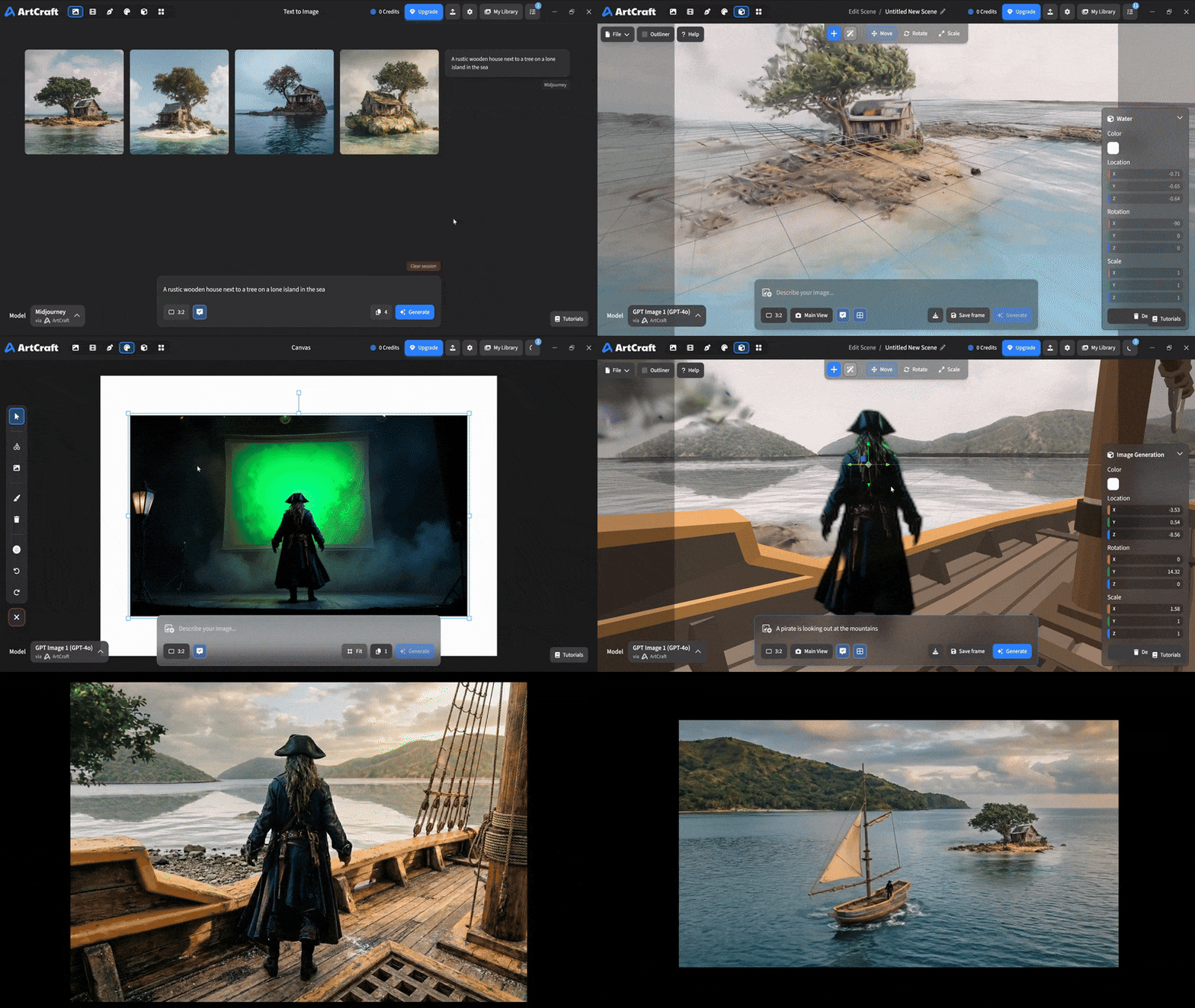 You can use image cutouts, worlds, and simple 3D meshes all together to precisely and intentionally lay out your scenes. You can use image cutouts, worlds, and simple 3D meshes all together to precisely and intentionally lay out your scenes. |
| Scene Blocking | (preview coming soon) |
| Canvas Editing | (preview coming soon) |
| Scene Relighting | (preview coming soon) |
Note: all of the above videos were generated for free with Grok Video; the cost to build this README was negligible.
Quick and Easy Prompting
We haven't abandoned text-to-asset generation for quick prototyping and ideation. We support every popular workflow in a first class fashion.
| Feature | Demo + Explanation |
|---|---|
| Text to Image | |
| Image Editing | |
| Image Editing | |
| Image to Video | |
| Image Inpainting | (preview coming soon) |
| Image Ingredients | (preview coming soon) |
Models and Providers Supported within Artcraft
| Provider | Features |
|---|---|
| Artcraft | Nano Banana, Nano Banana Pro, GPT-Image-1 / 1.5, Seedance 1.0 Lite / 1.5 Pro / 2.0, Seedream 4 / 4.5, Flux 1.1 / Kontext, Veo 2 / 3 / 3.1, Kling 1.6 / 2.1 / 2.5 / 2.6, Sora 2 / Pro, Hunyuan 3d 2 / 3 |
| Grok | Grok Imagine, Grok Video |
| Midjourney | Image Gen (all versions) |
| Sora | Sora 1, Sora 2, GPT-Image-1 |
| WorldLabs | Marble (Gaussian Splat World Generation) |
We're going to be adding the following providers soon: Kling (via Kling website accounts), Google (via API keys), Runway (via website account), Luma (via website account).
We're potentially interested in adding other aggregators for those who already have subscriptions and credits at those providers, for example: OpenArt, FreePik, etc.
Downloads
- Visit our website for the stable Windows and MacOS releases
- Or you can grab a more recent Windows and MacOS build directly
- Linux requires building from source for now