 Tanish Manku
f5b80ea982
Tanish Manku
f5b80ea982
Closes the two remaining fully-local-stack seams found after the last round.

Uploads (previously every upload endpoint returned 500 with dummy S3 creds -
the bucket put happens before the DB insert and rust-s3 is fail-on-err):
- LegacyBucketClient gains an internal backend enum (S3 unchanged | LocalDir)
  and a create_local(root, bucket_name, root_prefix) constructor. All upload/
  download methods route LocalDir to the filesystem; bucket_name() reports the
  configured name. Objects map disk = root + rooted object path via the new
  pub local_object_disk_path (rejects ".." and backslash segments - PMX zips
  feed user-controlled names), unit-tested. The fake-generation resolver now
  uses the same function instead of its private copy so the layouts can't
  drift.
- build_dependencies: when SERVER_ENVIRONMENT=Development and
  LOCAL_MEDIA_ROOT is set, all three bucket clients are constructed in local
  mode (private/gc have zero callers in storyteller-web, so this is purely
  uniform); the server_environment read moved above client construction.
  Uploads land under .devstack/media and are immediately viewable through
  the existing /media mount + CDN_BASE_URL - no S3/R2/MinIO.

Frontend (pagescene was the only surface actually broken against a local
backend; moodboard/library/create-* already consume media_links correctly):
- The vite /__cdn dev proxy assumed https upstreams, so localhost media
  (http) died on a TLS handshake with a 502 - breaking every pagescene
  GLB/splat/animation fetch. fetchAsset no longer proxies localhost at all
  (the dev backend sends CORS for any localhost origin), and the proxy
  itself now picks http for localhost hosts as a backstop.
- GetCdnOrigin() returns the API host when it is localhost (the local
  backend serves media itself; CDN origin == API origin), production CDN
  otherwise. The pagescene adapter's getCdnUrl skips the Cloudflare
  /cdn-cgi/image resize segment on localhost - the local backend has no
  resizer, and dev serves originals anyway.
- vite /v1 fallback proxy now targets http://localhost:12345 instead of
  production, so nothing can silently fall back to prod traffic in dev;
  fixed the stale main.tsx comment claiming setDevelopment() is disabled.

Docs: seams table updated (uploads + vite proxy + GetCdnOrigin closed;
API_TARGETS/SegmentationApi noted as dead code; the earlier moodboard claim
was wrong - it never had a hardcoded host), LOCAL_MEDIA_ROOT now documents
the storage mode, verification checklist gains the upload check.

Verified E2E on this machine: POST /v1/media_files/upload/image (multipart,
real endpoint) returns success, the object lands under .devstack/media at
the canonical fan-out path, lists in the library with media_class=image,
and serves 200 image/jpeg from http://localhost:12345/media/...;
cloud_storage unit tests pass; storyteller-web + webapp dev server boot
clean with "Local filesystem storage mode is ON".
The IDE for artists.




ArtCraft
ArtCraft is the IDE for interactive AI image and video creation. We turn prompting into crafting, so your ideas become a form of tangible expression and computing. This is Adobe Photoshop for everyone, and we're giving away the source code!
Show, Don't Tell: Advanced Crafting Features
Text-to-image is great, but artists need control. It's important to know what your image will look like before you generate it, and it's vitally important to achieve consistency and repeatability.
| Feature | Demo + Explanation |
|---|---|
| Image to Location | |
| 3D Image Compositing | |
| 2D Image Compositing | |
| Image to 3D Mesh | |
| Character Posing |  You can dynamically pose your characters to achieve the precise character, scene, and camera blocking before calling "action". You can dynamically pose your characters to achieve the precise character, scene, and camera blocking before calling "action". |
| Scene Blocking w/ Kit Bashing | |
| Character Identity Transfer | |
| Background Removal | |
| Mixed Asset Crafting | 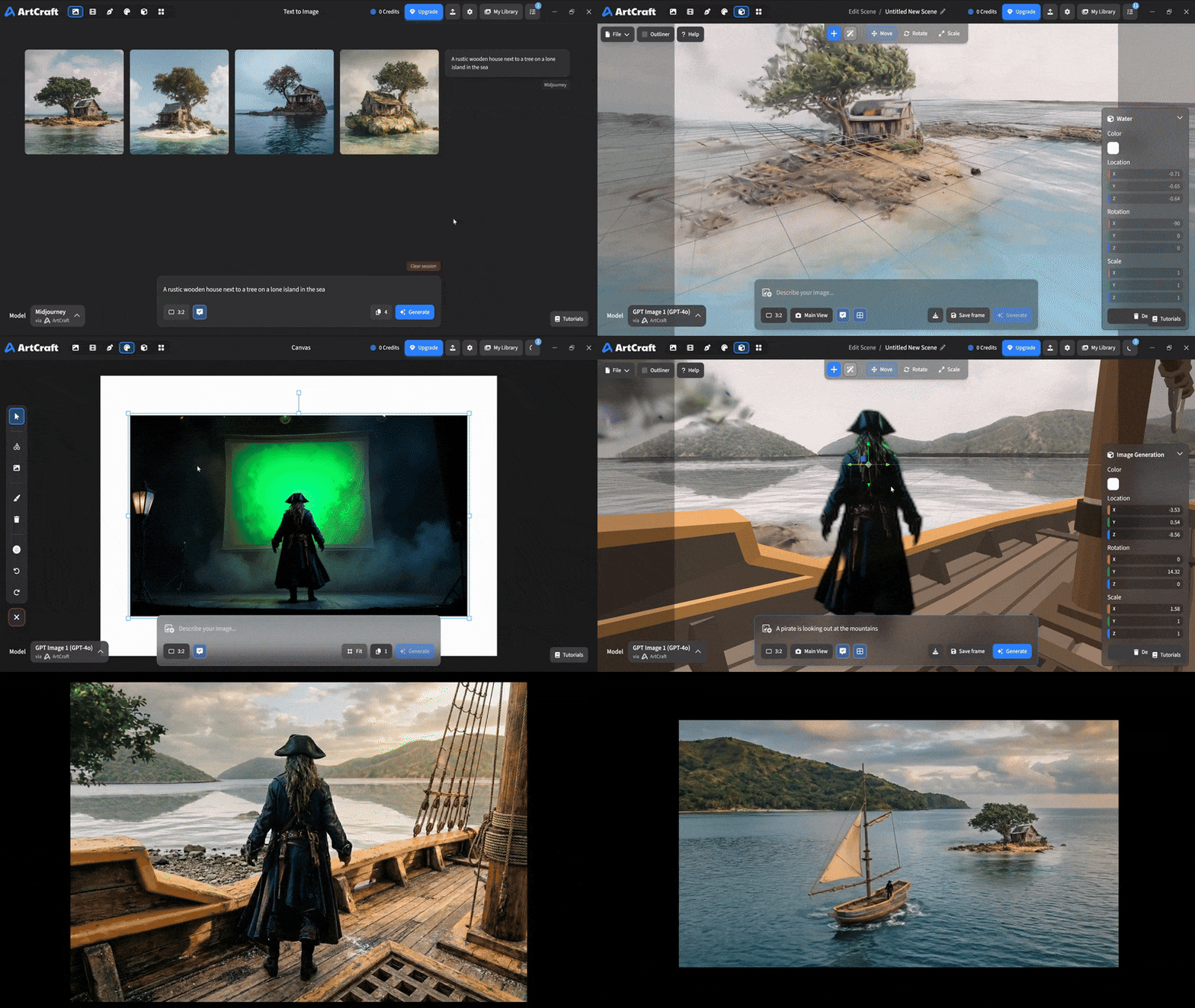 You can use image cutouts, worlds, and simple 3D meshes all together to precisely and intentionally lay out your scenes. You can use image cutouts, worlds, and simple 3D meshes all together to precisely and intentionally lay out your scenes. |
| Scene Blocking | (preview coming soon) |
| Canvas Editing | (preview coming soon) |
| Scene Relighting | (preview coming soon) |
Note: all of the above videos were generated for free with Grok Video; the cost to build this README was negligible.
Quick and Easy Prompting
We haven't abandoned text-to-asset generation for quick prototyping and ideation. We support every popular workflow in a first class fashion.
| Feature | Demo + Explanation |
|---|---|
| Text to Image | |
| Image Editing | |
| Image Editing | |
| Image to Video | |
| Image Inpainting | (preview coming soon) |
| Image Ingredients | (preview coming soon) |
Models and Providers Supported within Artcraft
| Provider | Features |
|---|---|
| Artcraft | Nano Banana, Nano Banana Pro, GPT-Image-1 / 1.5, Seedance 1.0 Lite / 1.5 Pro / 2.0, Seedream 4 / 4.5, Flux 1.1 / Kontext, Veo 2 / 3 / 3.1, Kling 1.6 / 2.1 / 2.5 / 2.6, Sora 2 / Pro, Hunyuan 3d 2 / 3 |
| Grok | Grok Imagine, Grok Video |
| Midjourney | Image Gen (all versions) |
| Sora | Sora 1, Sora 2, GPT-Image-1 |
| WorldLabs | Marble (Gaussian Splat World Generation) |
We're going to be adding the following providers soon: Kling (via Kling website accounts), Google (via API keys), Runway (via website account), Luma (via website account).
We're potentially interested in adding other aggregators for those who already have subscriptions and credits at those providers, for example: OpenArt, FreePik, etc.
Downloads
- Visit our website for the stable Windows and MacOS releases
- Or you can grab a more recent Windows and MacOS build directly
- Linux requires building from source for now